

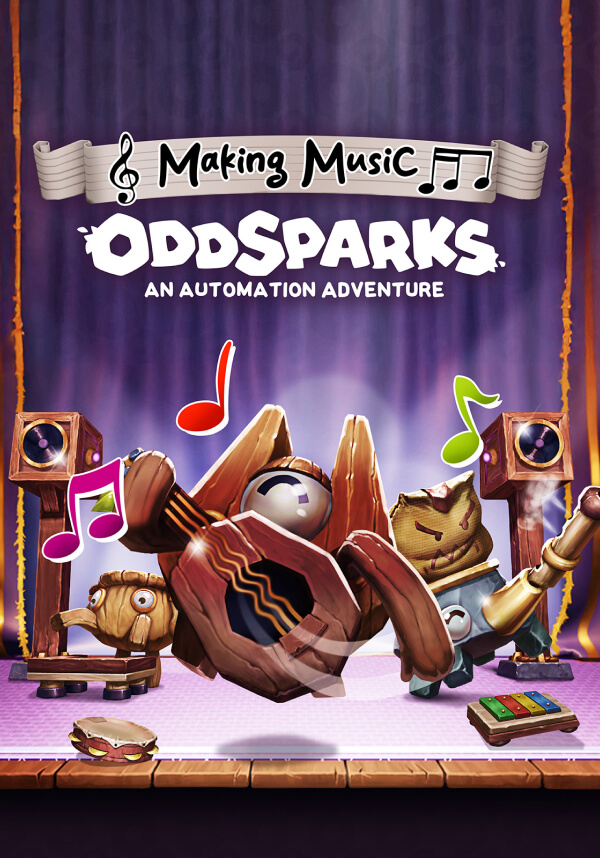
Oddsparks: An Automation Adventure - Making Music (DLC)
dlc
본 제품은 귀하의 지역에서 사용 불가능합니다
이 부가 기능을 실행하려면 기본 게임버전이 필요합니다.


Build. Automate. Compose.
Strike up the band and march to the beat of your own automation in the Making Music DLC for Oddsparks: An Automation Adventure! This playful yet powerful DLC introduces a brand-new musical system that lets you turn your factory into a fully orchestrated machine of rhythm and melody.
Let your creativity resonate. Add music to your mechanics, and harmony to your hustle!
This DLC includes:
- New logic items: Musical Pressure Plate (Tier 2) and Musical Speaker (Tier 4)
- New Sawbench recipes: toy piano, toy flute, toy lute, and toy xylophone (Tier 2)
- New workstation: Musical Workstation (Tier 2)
- New Musical Workstation recipes: 12 notes and 2 octave markers (Tier 2)
- New path add-on: Metronome (Tier 2)
- New decoration: Spark Showcase – Band (Tier 1)
- New quests: Musical Constructions (Tier 2) and Musical Speaker (Tier 4)
Compose as You Build
Every Spark step can now strike a chord, literally! Use Musical Pressure Plates to play sounds as Sparks pass by, and control Musical Speakers through the logic systems to bring complex arrangements to life. Timing is Spark-based, and every existing item can now be used to create different sounds.
Craft Your Instruments & Sounds
Unleash your musical creativity! Unlock the Musical Workstation and craft a complete set of 12 musical notes and 2 octave markers. And there's more: your Sawbench can now fashion four charming toy instruments (piano, flute, lute, and xylophone), ideal for bringing a touch of melody to your workshops.
Set the Stage
Want to see your Sparks rock out? Build the Spark Showcase - Band, a dedicated concert stage where your Sparks perform together in sync.
- - Requires a 64-bit processor and operating system
- - OS: Windows 10 64bit
- - Processor: Intel Core i5 / AMD FX-6300
- - Memory: 8 GB RAM
- - Graphics: GTX 970 4GB / Radeon RX580 4GB or better
- - DirectX: Version 11
- - Storage: 6 GB available space
STEAM
1. Steam 계정을 등록
2. "나 게임" 메뉴에서 "Steam을 통해 활성화..." 버튼을 클릭하고 키를 입력
dlc
Oddsparks: An Automation Adventure – Deluxe Upgrade
dlc
Oddsparks: An Automation Adventure - Craftsman's Elemental Decorations Pack

dlc
Oddsparks: An Automation Adventure - Hats & Helmets

dlc
Oddsparks: An Automation Adventure - Tailor's Animal Costumes Pack

dlc
Oddsparks: An Automation Adventure - Coaster Rush



